Workflow, Graph or Swarm? Choosing a Strands Multi-Agent Pattern

AWS's Strands Agents SDK gives you three ways to make several agents work on one problem: Workflow, Graph and Swarm. The documentation has a comparison table with nine rows, which is thorough and — the first time you read it — not much help, because nine differences is eight more than you can hold in your head while deciding.
There is really only one difference. Everything else falls out of it.
The one question
Who decides what runs next?
- Workflow — you do, entirely, up front. You write down the tasks and their dependencies, and that's the shape of the run.
- Graph — you draw the map, and an LLM picks the turns. You define every node and every edge that could be taken; which ones actually get taken depends on what happens at runtime.
- Swarm — the agents do. You supply a pool of specialists and a goal, and they hand off to each other until they're done. You never draw the path because there isn't one until it happens.
That's the whole taxonomy. Fixed, guided, emergent.
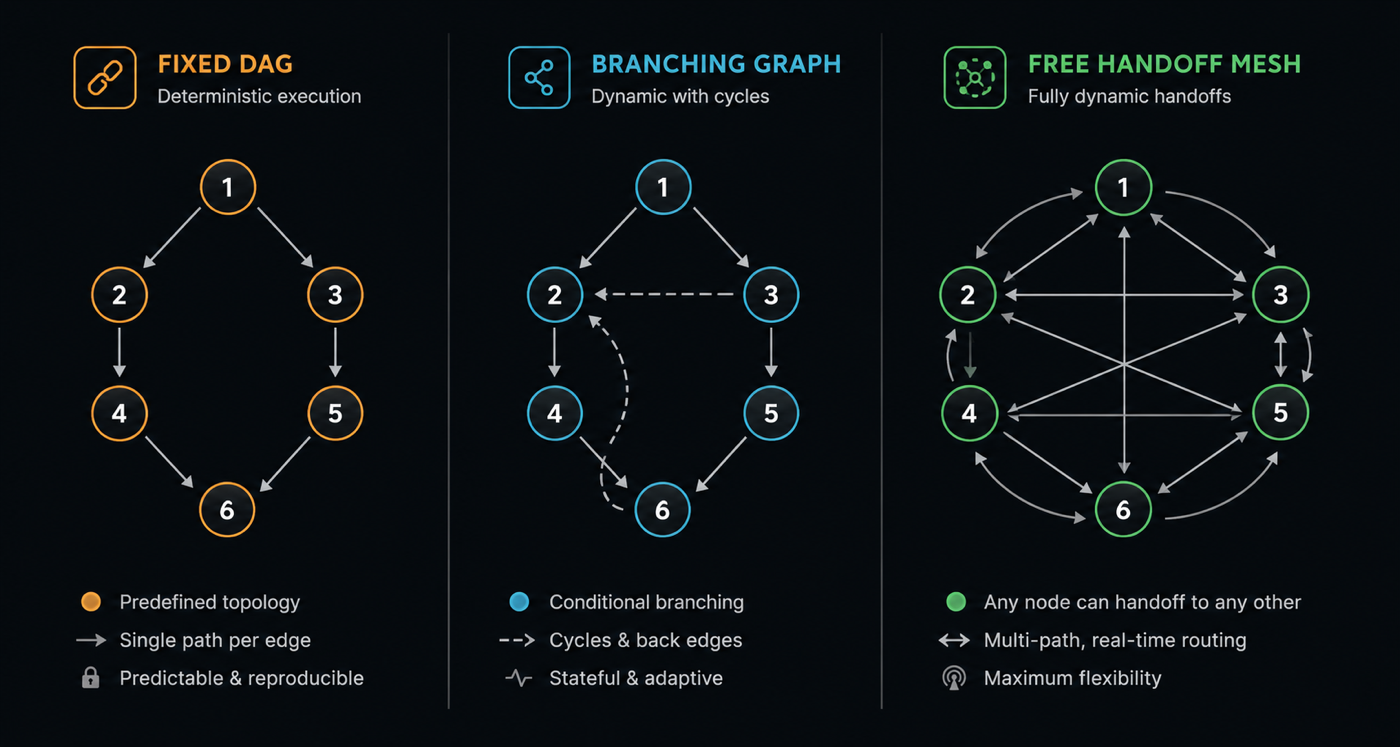
One problem, three shapes
Take something concrete: generating release notes for everything merged between two tags. It needs the diff summarised, issue references resolved, breaking changes flagged, and the whole thing written up. It's a good test case because it can reasonably be built all three ways, and the three versions behave genuinely differently.
As a Workflow
The workflow tool ships in the strands-agents-tools package. You hand it a list of tasks with dependencies, and it resolves the order, runs what it can in parallel, and pipes each task's output into its dependents.
from strands import Agent
from strands_tools import workflow

agent = Agent(tools=[workflow])

agent.tool.workflow(
    action="create",
    workflow_id="release_notes",
    tasks=[
        {
            "task_id": "extract_changes",
            "description": "Summarise every commit between v2.3.0 and v2.4.0.",
            "system_prompt": "You summarise git history into user-facing changes.",
            "priority": 5,
        },
        {
            "task_id": "link_issues",
            "description": "Resolve issue and PR references in the commit range.",
            "system_prompt": "You map commits to the issues they close.",
            "priority": 5,
        },
        {
            "task_id": "summarise",
            "description": "Group the changes into themes, most significant first.",
            "dependencies": ["extract_changes", "link_issues"],
            "system_prompt": "You organise changelogs by user impact.",
            "priority": 3,
        },
        {
            "task_id": "format_notes",
            "description": "Render the grouped changes as markdown release notes.",
            "dependencies": ["summarise"],
            "system_prompt": "You write clear, terse release notes.",
            "priority": 2,
        },
    ],
)

agent.tool.workflow(action="start", workflow_id="release_notes")
extract_changes and link_issues declare no dependencies, so they run at the same time. summarise waits for both. Nothing about the run is a surprise: same tasks, same order, every time.
What you get for that rigidity is real. The workflow tool persists its state, so you can pause and resume a run, inspect intermediate results, and recover from a failure without starting over. Each task receives a curated summary of just its dependencies' outputs rather than the whole conversation, which keeps token costs sane on long chains.
What you give up is any ability to react. There are no branches and no loops — it's a DAG, and that's enforced. If extract_changes fails, everything downstream of it fails with it and the run lands in a failed state.
As a Graph
A Graph keeps the explicit topology but lets the path through it depend on what actually happened. Nodes are agents (or nested graphs, or swarms, or custom deterministic Python), edges are transitions, and edges can carry conditions.
from strands import Agent
from strands.multiagent import GraphBuilder

changelog = Agent(name="changelog", system_prompt="You summarise merged changes.")
breaking = Agent(name="breaking", system_prompt="You detect breaking API changes. Reply BREAKING or CLEAN.")
migration = Agent(name="migration", system_prompt="You write upgrade guides for breaking changes.")
editor = Agent(name="editor", system_prompt="You assemble the final release notes.")

def has_breaking_changes(state):
    node = state.results.get("breaking_check")
    return bool(node) and "BREAKING" in str(node.result)

builder = GraphBuilder()
builder.add_node(changelog, "changelog")
builder.add_node(breaking, "breaking_check")
builder.add_node(migration, "migration_guide")
builder.add_node(editor, "editor")

builder.add_edge("changelog", "breaking_check")
builder.add_edge("breaking_check", "migration_guide", condition=has_breaking_changes)
builder.add_edge("migration_guide", "editor")

builder.set_entry_point("changelog")
builder.set_execution_timeout(600)

graph = builder.build()
result = graph("Draft release notes for v2.3.0 to v2.4.0")

print(result.status)
print([node.node_id for node in result.execution_order])
The migration guide is now written only when there's something to migrate. Add a revise edge from editor back to changelog and you have an iterative review loop — graphs explicitly support cycles, with execution limits to stop them running away.
The trade is context. Every agent in a graph shares the full transcript, which is what makes the conditional routing sensible and also what makes a long graph expensive.
As a Swarm
Now suppose you don't know the shape in advance. Some releases are pure bugfixes. Some contain a CVE fix that needs a security advisory. Some change public API and need documentation attention. Encoding every combination as edges gets silly fast.
A Swarm skips the topology. You give it specialists and it routes itself — each agent is automatically given handoff tooling and a shared working memory containing the original request and everything contributed so far.
from strands import Agent
from strands.multiagent import Swarm

changelog = Agent(name="changelog_writer", system_prompt="You draft release notes.")
security = Agent(name="security_analyst", system_prompt="You write advisories for security fixes.")
api_docs = Agent(name="api_docs", system_prompt="You document public API changes.")
editor = Agent(name="editor", system_prompt="You assemble and finalise release notes.")

swarm = Swarm(
    [changelog, security, api_docs, editor],
    entry_point=changelog,
    max_handoffs=20,
    max_iterations=20,
    execution_timeout=900.0,
    node_timeout=300.0,
    repetitive_handoff_detection_window=8,
    repetitive_handoff_min_unique_agents=3,
)

result = swarm("Draft release notes for v2.3.0 to v2.4.0")
print([node.node_id for node in result.node_history])
The changelog writer spots a CVE fix and hands off to the security analyst; the analyst notices a signature change and passes it to API docs; eventually someone hands off to the editor. On a boring release, the writer goes straight to the editor and the other two never run.
You cannot predict node_history before the run. That is the entire point, and also the entire cost.
The differences that follow
| Workflow | Graph | Swarm | |
|---|---|---|---|
| Path decided by | You, at design time | Your edges + LLM decisions | The agents |
| Cycles | No — DAG only | Yes | Yes |
| Parallelism | Yes, automatic | Yes, across branches | No — sequential handoffs |
| Context each agent sees | Just its dependencies' outputs | Full shared transcript | Full shared handoff history |
| On failure | Downstream halts, run fails | Route it with an error edge | An agent hands off; limits catch loops |
| Reproducible | Yes | Structurally | No |
Note the parallelism row. It's easy to assume a swarm of agents means agents working simultaneously — it doesn't. A swarm is a sequential relay where the baton is passed by whoever's holding it. If you want concurrent execution, that's Workflow or Graph.
Four things worth knowing before you build
Graph edges in Python default to OR, not AND. A node fires when any incoming edge's source completes — not when all of them do. Look again at the graph above: if I add builder.add_edge("breaking_check", "editor") so the editor also runs on clean releases, the editor may start the moment breaking_check lands, without waiting for migration_guide. To get AND semantics you write it explicitly:
from strands.multiagent.base import Status

def all_complete(required):
    def check(state):
        return all(
            node_id in state.results and state.results[node_id].status == Status.COMPLETED
            for node_id in required
        )
    return check

builder.add_edge("migration_guide", "editor", condition=all_complete(["breaking_check", "migration_guide"]))
This one catches people, and it's SDK-specific — other Strands SDKs default to AND.
Swarm loop detection is off by default. repetitive_handoff_detection_window and repetitive_handoff_min_unique_agents both default to 0, meaning disabled. Two agents can ping-pong at each other until max_handoffs (20) or execution_timeout (15 minutes) trips. Set them.
The patterns nest. A Swarm can be a node inside a Graph. This is usually the right answer for real systems: a deterministic outer pipeline with one genuinely open-ended stage in the middle, rather than committing the entire system to emergent behaviour.
There's a fourth pattern. If the work is a set of independent jobs and you want one orchestrator making all the calls, plain agents-as-tools may be all you need. Not everything requires a topology.
How I'd choose
- Is the process the same every time? Use a Workflow. Reach for it whenever "repeatable" and "auditable" matter more than "clever" — data pipelines, standard business processes, anything you want to be able to resume after a failure.
- Is the process the same every time, except for the branches? Use a Graph. Conditional routing, error paths, review loops — a business process with
ifstatements in it. - Do you genuinely not know the shape? Use a Swarm. Exploratory or diagnostic work where the right sequence of specialists depends on what you find.
The failure mode I'd watch for is reaching for a Swarm because it's the most interesting one. Emergent routing is the hardest to test, the hardest to cost, and the hardest to explain when it does something odd at three in the morning. Most problems that look like they need a swarm are a graph with a couple of conditional edges — and a graph will tell you what it's going to do before it does it.
Start with the most constrained pattern that fits, and loosen it only when the problem actually demands it.